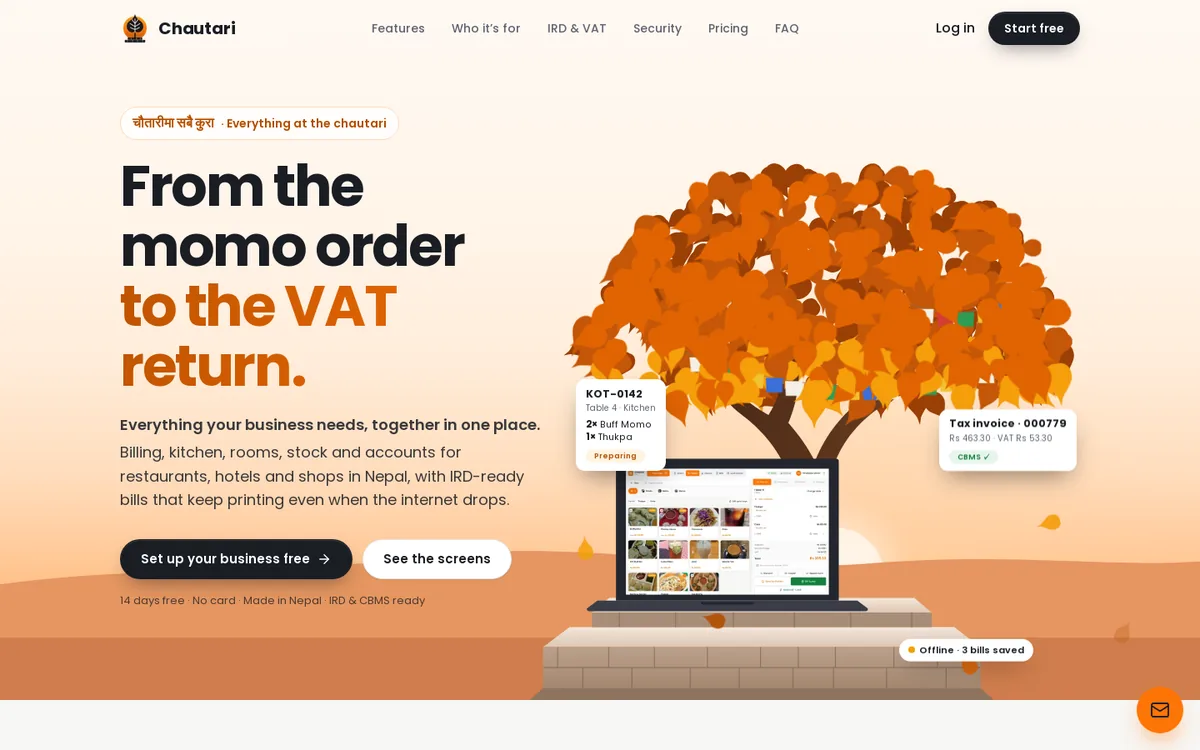
Every evening, in thousands of shops and restaurants across Nepal, someone sits down with a pile of paper bills, a calculator and a tired face. They add up the day. They check the VAT. They try to remember which payment came through eSewa and which one was cash. A missing number can ruin the whole night.
This is the problem I wanted to fix when I built Chautari. It is an AI POS system for Nepal: billing, kitchen, rooms, stock and accounts in one place, with IRD-ready bills that keep printing even when the internet drops. On top of that, it has AI features, such as voice-based ordering and automatic bill reading with OCR.
In this guide I will explain what a POS system is, what Chautari does, how the AI helps, who it is for, and who should not use it. I will keep the words simple and the claims honest. By the end you will know if it fits your business.
What is an AI POS system, and why does it matter?
A POS system is the place where a sale happens. In a shop, it is the counter. In a restaurant, it is the till and the screen the waiter uses. The software behind it makes the bill, takes the payment and records the sale. If you want the textbook definition, Wikipedia's point of sale page explains it well.
An AI POS system adds smart tools to that core job. Instead of typing everything by hand, the system can listen to a spoken order, or read a bill from a picture. It saves typing, and it lowers the chance of a typing mistake.
Think of two shop assistants. The first types every number by hand. The second has a helper who reads the paper bill aloud and enters it for them. The second assistant is faster, and tired fingers cause fewer errors.
What does a normal POS already do?
Before we talk about AI, let us look at the basics. A good POS should:
- Make a correct bill every time
- Work out tax without you typing it
- Take cash, card and wallet payments
- Update your stock when you sell something
- Show you what you sold today, this week and this month
- Keep working when the internet is slow or gone
If a POS does not do these well, AI will not save it. So I built the basics first, and then added the AI.
Why do Nepali businesses need something different?
Because the rules and habits are different here. Bills need to follow the IRD (Inland Revenue Department) format, with your PAN and gap-free bill numbers. VAT is 13 percent. Your fiscal year runs by the Bikram Sambat calendar. Staff may prefer Nepali on the screen. Customers pay by eSewa, Khalti or Fonepay as often as by cash. And the internet can drop in the middle of dinner.
A tool built for another country may not handle these well. That is why Chautari is made in Nepal, for Nepal.
Why did I build Chautari?
I am Hompushparaj Mehta, a software engineer and a co-founder of Chautari. I am also a co-founder of MeetOnChai Studio in Kathmandu, which builds web apps, mobile apps and AI features for clients. Chautari is our own product, not a client project.
I will be honest about how I think about it. When you build software for many clients, you start to notice that businesses repeat the same pain. Billing is one of the biggest. A restaurant, a guest house and a small mart all need the same few things: a correct bill, correct tax, correct stock and correct books. Yet many of them use different tools for each, and nothing matches at the end of the day.
The word chautari means a resting place under a tree where people meet and talk. I liked the idea of a place where the whole business comes together: the till, the kitchen, the front desk and the books. The tagline on the product sums it up: everything your business needs, together in one place.
What problem did I want to solve?
Three problems kept coming up.
- Tax and bills. Getting an IRD-style invoice right, with the right PAN and number, is stressful when done by hand.
- Many tools that do not talk to each other. The billing is in one place, the stock in a notebook, the accounts in a sheet.
- Typing. So much of a small business day is typing: orders, bills, numbers. Typing is slow, and it is where mistakes sneak in.
The first two are about structure. The third is where AI helps most. That is why voice ordering and OCR bill reading are part of the product.
What did I learn along the way?
Most of what I learned is about trust. A business owner will not use a system they cannot check. So bills and records cannot be changed quietly after the fact. If you must fix something, you make a credit note or a reversal, and the system keeps an audit log. I think this is a good habit for any accounting tool.
I also learned that offline matters more than most people admit. A bill system that stops when the router stops is not good enough for a busy night. So Chautari keeps its own copy of the menu, prices and tables, and carries on.
Who is Chautari for?
Chautari is built for four kinds of businesses.
| Business | What it gets |
|---|---|
| Restaurants and cafés | Tables, kitchen and bar tickets, split bills, QR ordering |
| Hotels and guest houses | Bookings, check-in and check-out, housekeeping, room service, one folio |
| Shops and marts | Barcode scanning, stock, purchase orders, reorder alerts |
| Businesses that run more than one | All of the above under one roof, sharing one set of books |
A momo shop, a lakeside guest house, or both: that is how the product page puts it, and it is a fair picture.
Why do multi-branch owners like it?
If you run a café and a small shop, you do not want two sets of books. In Chautari, you turn on what you run, and everything shares one set of accounts. Each branch only sees its own data. The owner sees the whole picture.
Do I need special hardware?
No. Chautari runs in the browser on the laptop, tablet or desktop you already have. If you want to print receipts and kitchen tickets, printers on your network connect through a small print agent. That agent keeps printing even when the internet is down. It also supports barcode scanning and a cash drawer.
What problems does Chautari solve for restaurants?
Restaurants have the hardest billing day. Orders come from many places, the kitchen needs clear tickets, and guests change their minds. Here is what Chautari does.
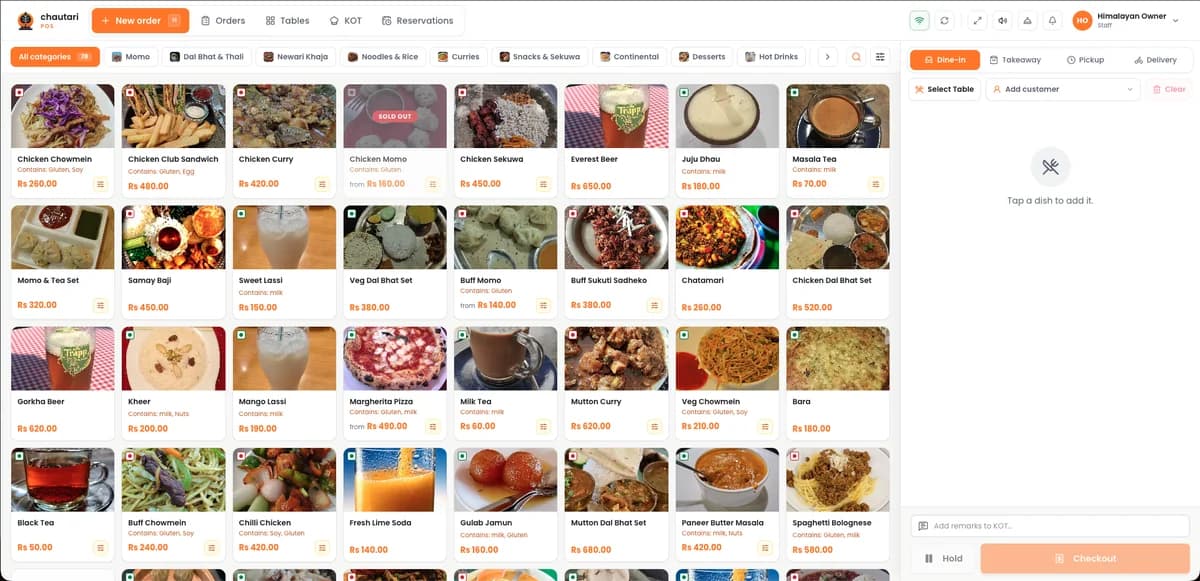
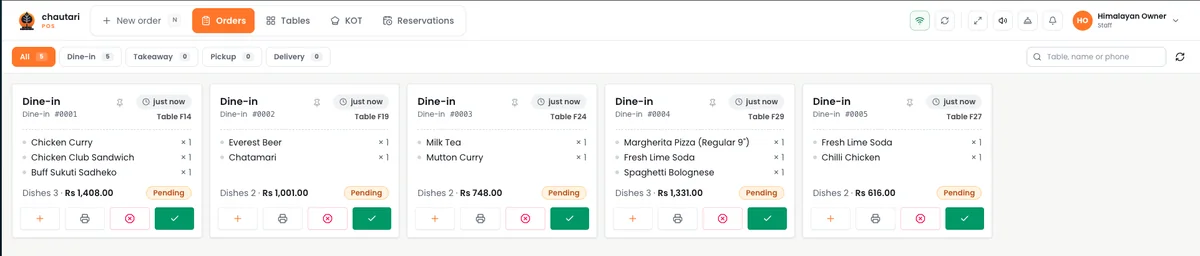
- Dine-in, takeaway, pickup and delivery from one screen
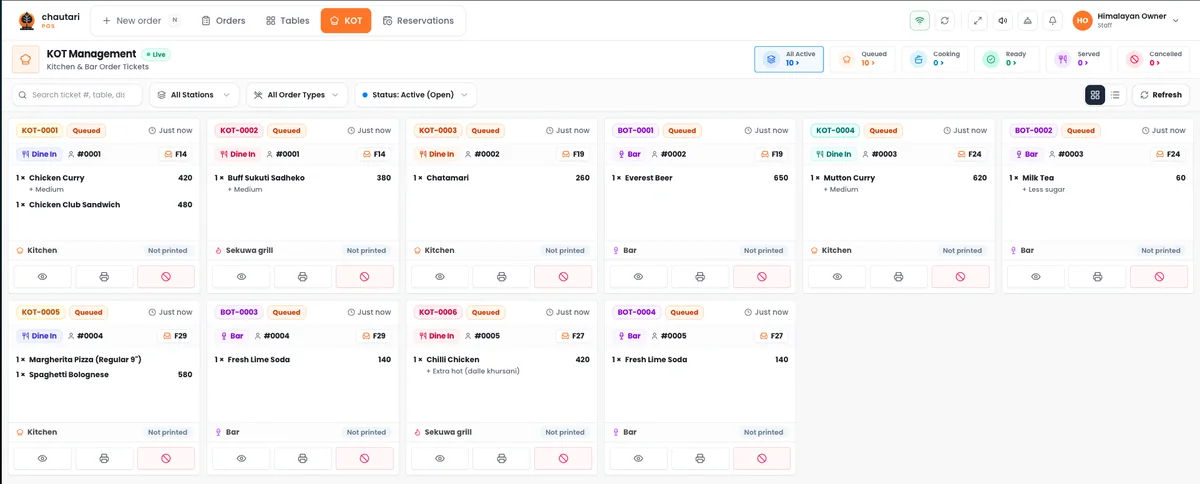
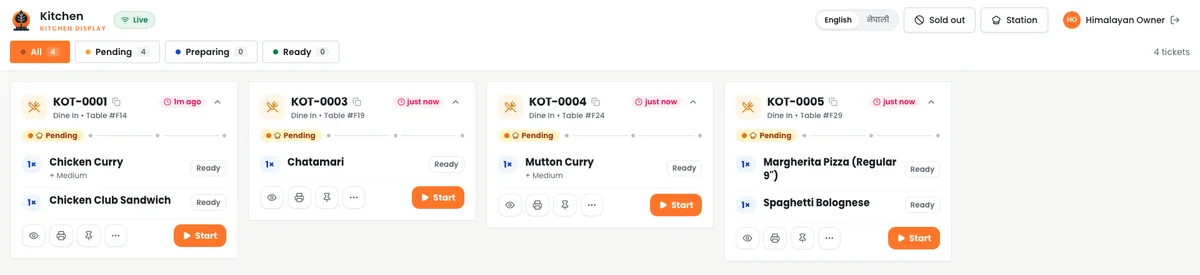
- Orders print, or show on a screen, in the kitchen and bar as tickets
- Split the bill, merge tables, and move guests from one table to another
- Guests can order from a QR code on the table
How does the kitchen screen help?
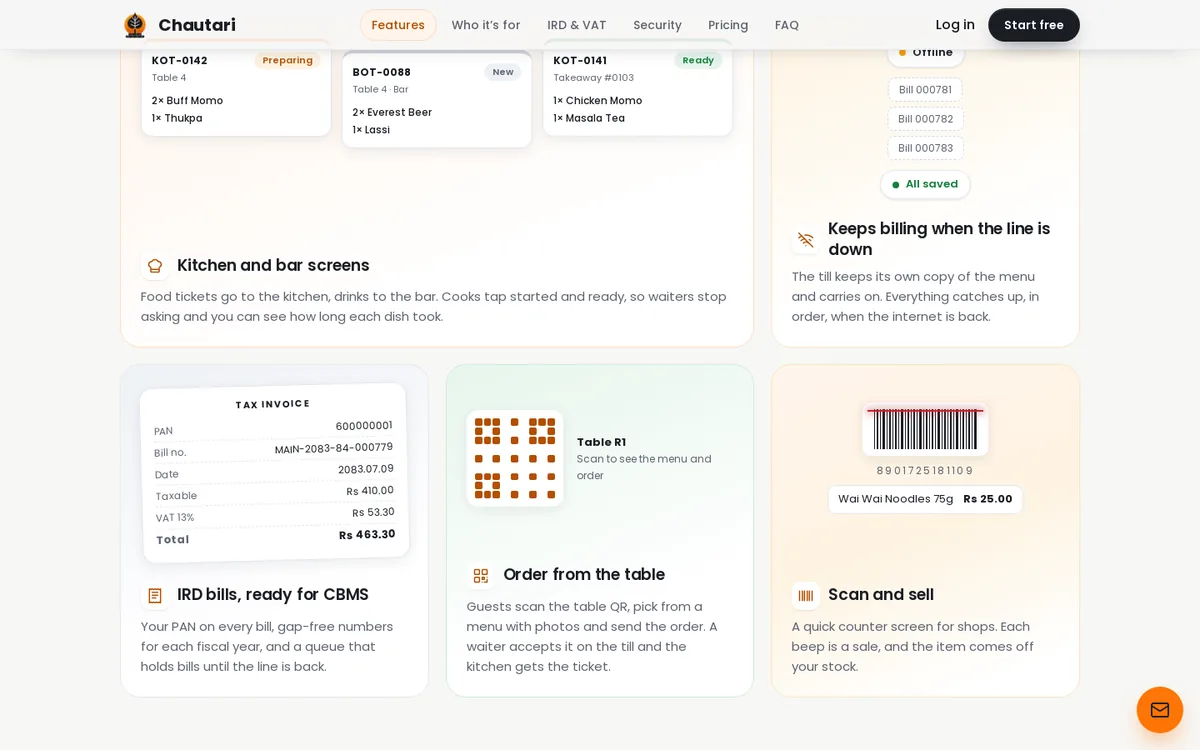
Without a kitchen screen, a waiter writes an order, walks to the kitchen and hopes the cook can read it. With one, the order appears as a ticket the moment it is placed. Kitchen and bar tickets are kept apart, so the barista does not see the cook's list. A ticket moves from "New" to "Preparing" to "Ready", and the front of house can see it.
What about the bill at the end?
The bill splits cleanly, with service charge and VAT worked out for you. You can take cash, card, eSewa, Khalti or Fonepay. Each method is recorded apart, so your cash drawer count is never off because of a wallet payment.
What problems does Chautari solve for hotels and guest houses?
A guest house has two businesses in one: rooms and food. Most small hotels use a notebook for one and a till for the other. The result is double work at check-out.
Chautari ties them together:
- Bookings, check-in, check-out and housekeeping
- Rate plans with seasonal prices
- Restaurant bills and room service go on the guest's folio
- One IRD bill at check-out
- A guest register, an occupancy report, and encrypted ID numbers
How does room service work?
A guest can order from a QR code in the room. They confirm the surname on the booking, and then they order. The order goes to the kitchen, and the cost goes onto the folio. At check-out, the guest pays once.
What about housekeeping?
Every room has a status, so the front desk knows which rooms are ready, which are being cleaned and which are not. It sounds small. For a team of three people, it saves a lot of walking and phone calls.
How does AI help in Chautari?
This is the part that makes Chautari more than a normal till. I want to describe it plainly and not oversell it. Two AI features are important.
What is voice-based ordering?
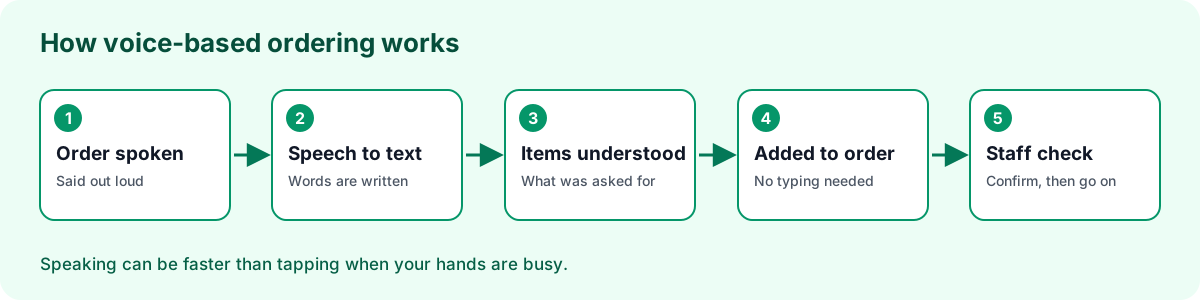
Voice-based ordering means an order can be given by speaking, not only by tapping and typing. The system listens, turns the speech into text, understands what was asked, and puts it into the order.
Why does this matter? A busy counter or kitchen is a place where hands are full. Speaking is often faster than finding the right button. For people who are not comfortable with screens, it can also feel more natural.
What is automatic bill reading with OCR?
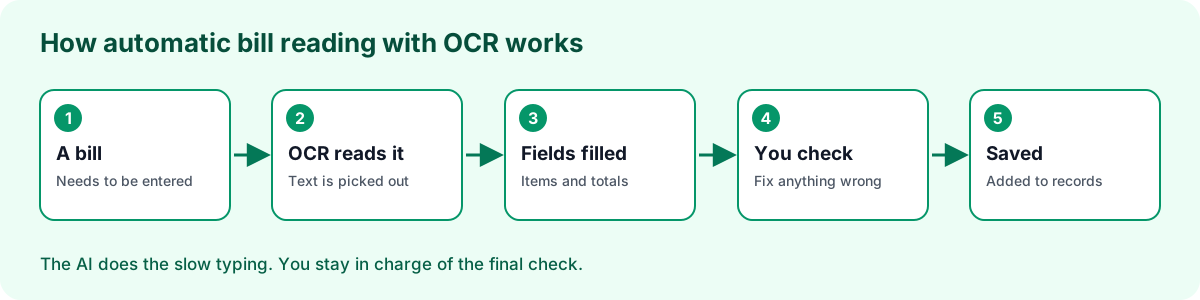
OCR stands for optical character recognition. It is the technology that reads printed text from a picture. In Chautari, AI bill reading uses OCR to read a bill and add it to your records automatically, so you do not have to type each line by hand.
Picture a shop owner who gets a stack of purchase bills each week. Typing each line, item name, quantity, rate and total, takes a long time and is easy to get wrong. With bill reading, the system reads the bill and fills in the entry. The owner checks it and confirms. The person is still in charge. The AI just does the first, slow pass.
Why keep a human in the loop?
AI can misread a blurry number or a smudged line. In accounting, one wrong digit matters. So the right way to use these tools is: the AI does the typing, and you do the checking. This is the same idea I use in all my AI work. Let the machine do the boring part, and keep the person responsible for the final call.
What AI facts am I not claiming?
I do not want to promise things I cannot back up. I am not claiming a specific accuracy number, and I am not claiming that every language or every bill layout works perfectly. Test it with your own bills during the free trial and judge for yourself. That is the only honest way to decide.
What problems does Chautari solve for shops and marts?
A shop lives and dies by its stock. If you do not know what is on the shelf, you lose sales or you tie up money in things that do not sell. Chautari helps in these ways:
- Scan barcodes on a fast counter screen
- Stock comes down with every sale
- Purchase orders, goods received and supplier bills
- Reorder levels warn you before a shelf is empty
- Barcodes, units and reorder levels set per product
- Stock takes and adjustments, each with a reason
- Stock value shows on the balance sheet and stays current
How do reorder alerts help?
You set a level for each product. When the stock falls to that level, the system warns you. You no longer find out a product is gone only when a customer asks for it. For a small mart with hundreds of items, this one feature can pay for the software.
What about the paperwork when goods arrive?
You make a purchase order, receive the goods against it, and record the supplier's bill. Your stock goes up and your payables are updated. And this is where bill reading with OCR can save you the most typing.
How does Chautari handle IRD, VAT and Nepali dates?
This is the part I care about most, because it is where generic tools struggle. Here is what the product does for Nepal.
- 13%VAT, set by dish, category or order
- 5ways to take payment
- 2calendars on every report
- 2languages for your staff
| Need | What Chautari does |
|---|---|
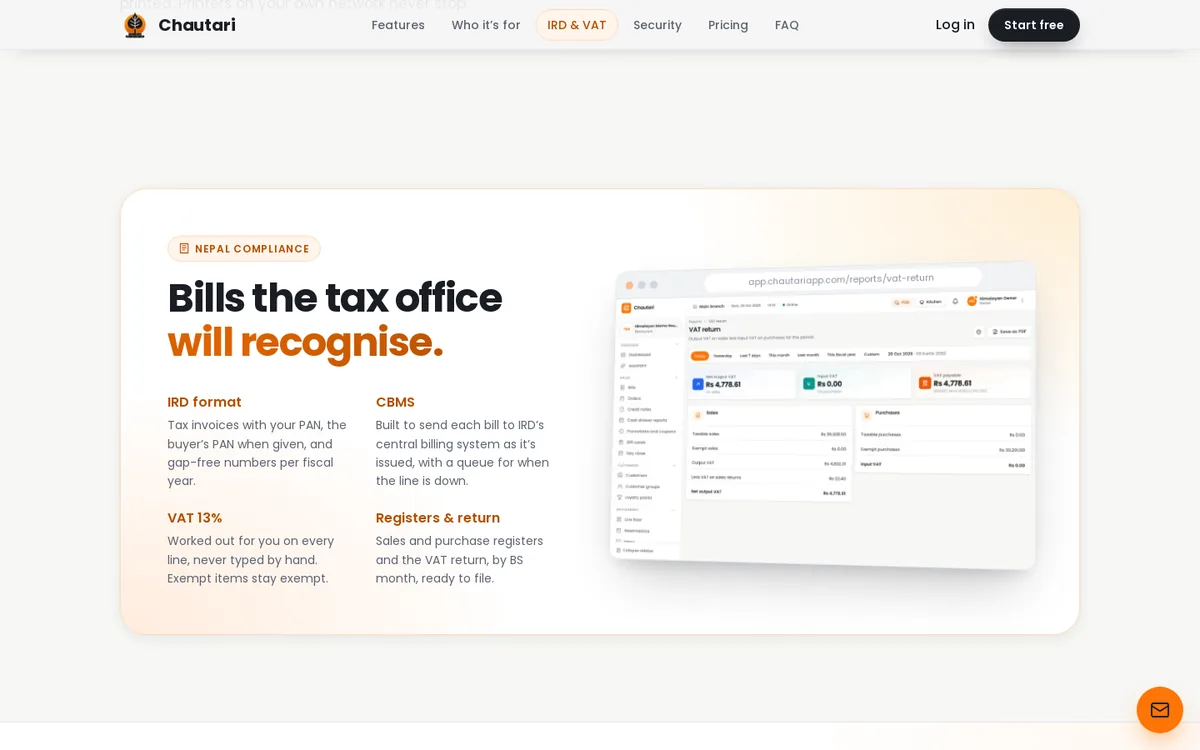
| IRD tax invoice | Bills carry your PAN, the buyer's PAN when given, and gap-free numbers for each fiscal year |
| VAT | 13% worked out on every line, never typed by hand. Set it by dish, by category or for the whole order. Exempt items stay exempt |
| CBMS | Built to send each bill to the IRD's central billing system as it is issued, with a queue for when the line is down |
| Registers and returns | Sales and purchase registers and the VAT return, by Bikram Sambat month |
| Calendar | Bikram Sambat built in, with the English date beside it |
| Language | Switch any screen between Nepali and English |
Can I set VAT by dish, by category or for the whole order?
Yes. VAT is configurable. You can set it on a single dish, on a whole category, or on the full order. This helps because not every item is treated the same way. A restaurant may have items that are taxed and items that are not, and a shop may have exempt goods next to normal ones.
Set the rule once, and the system applies it on every bill. You do not type VAT by hand at the counter. If you are not sure how a particular item should be treated, ask your accountant first, then set it in Chautari.
Is Chautari IRD-approved for me?
Here is a point I want to be clear about. The software is built to follow the IRD's bill format and to send bills to CBMS. But registering software with the IRD is still done in your business's name. That is a step you take, not something the software does for you. Check the current IRD rules for your business type, and ask an accountant if you are unsure.
What does "gap-free numbers" mean?
It means that bill numbers go 1, 2, 3, with no holes. A missing number looks suspicious to a tax officer. If you must cancel a bill, it is marked as voided and stays in the list. It does not disappear.
How does the calendar help day to day?
Every report can show the Bikram Sambat date and the English date. Your fiscal year is shown the way Nepali businesses think about it, from Shrawan to Ashadh. You will not have to convert dates in your head when you file.
What happens when the internet goes down?
In Nepal, this is not a rare event. Rain, a loose cable or a power cut can drop the line in the middle of the evening rush. If your billing stops, your business stops.
Chautari is offline first. The till keeps its own copy of the menu, prices and tables, so orders, kitchen tickets and bills carry on. Here is how the product page describes an evening.
- At 8:02 pm the router drops. The status bar says "Offline," and work goes on.
- Bills keep printing through the print agent on your local network.
- At 8:47 pm the line returns. The status bar shows that everything has synced, and the bills are in the books.
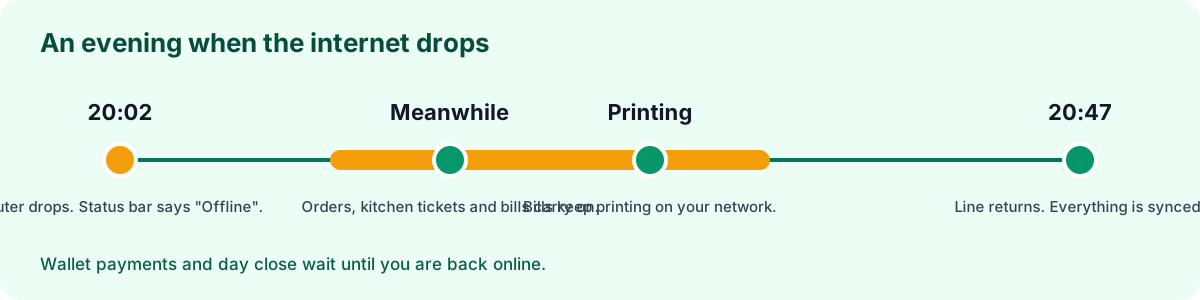
Some things have to wait until you are back online. Wallet payments and day close are the main ones, because they need to check with the outside world. Everything else keeps moving.
Why is offline so important for IRD bills?
Because bills must still be numbered and printed, even without a connection. The CBMS feature keeps a queue, so bills are sent when the line is back. You do not lose anything, and you do not stop serving customers.
Which payment methods does Chautari support?
Payment habits in Nepal are mixed. A customer may hand you cash, tap a card, or scan a QR code. Chautari supports these:
| Method | How it works |
|---|---|
| Cash | Counted into the drawer, with the difference shown at day close |
| Card | Taken on your bank's terminal and recorded against the bill |
| eSewa | Guests scan your QR at the counter, and the bill records the method |
| Khalti | Kept apart from cash, so the drawer count is never off by a wallet payment |
| Fonepay | Bank QR payments recorded against the bill like any other method |
| Charge to room | Hotel guests sign the bill to their folio and pay at check-out |
Why keep each method apart?
When everything is mixed, the cash drawer never matches. One wallet payment is enough to make the count wrong. Recording each method on its own means that, at day close, you count only the cash in the drawer, and the rest is already matched to the bills.
Does Chautari also do accounting?
Yes. This is a big difference from a plain billing tool. Chautari includes double-entry books, so the money from every bill flows into your accounts.
- Day book: every voucher of the day, and how cash and bank moved
- Ledger and trial balance: balances that always agree
- Receivables and payables: who owes you, whom you owe, and for how long
- Bank reconciliation: match the statement line by line
- Cash drawers and day close: count the till, see the difference, close the day
- Exports: Tally, Xero, QuickBooks, CSV and PDF
Why does this save time with my accountant?
Many small businesses hand a box of bills to an accountant at the end of the month. That costs money and time. When your sales, purchases and stock already flow into the books, the accountant starts from clean records. They can also take an export for Tally, if that is what they use.
What reports will I actually look at?
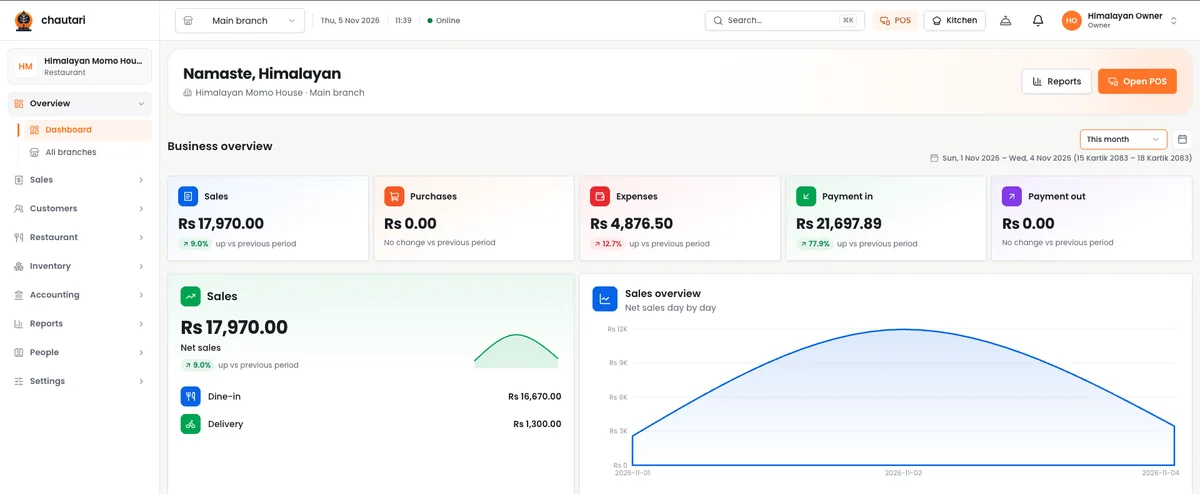
Most owners look at three things: today's sales, who owes them money, and what is low in stock. Chautari shows these quickly. The bills list shows the total billed for the day, what is not paid yet, and what was voided.
How safe is my business data?
You are trusting the system with your sales and guest details, so I take this part seriously. The product page lists these points.
- Each business is walled off. Every row of data belongs to one business.
- Backed up often. Data is copied off-site at least once a minute, and a full restore is tested every month.
- Safe sign-in. Strong password hashing, optional two-step sign-in, and a PIN for each person on the till.
- People see their part. Cashiers bill, managers approve voids, and owners see the books. Each branch sees only its own data.
- Nothing quietly changed. Bills and vouchers are never edited after the fact. Corrections are credit notes and reversals, with an audit log.
- Meant to stay in Nepal. Chautari is built to run on servers in Nepal, so your sales and guest data can stay in the country.
Why are voids and credit notes better than editing?
If a bill can be edited, it can be changed to hide a theft. A system that only allows credit notes and reversals leaves a trail. This protects the owner from staff mistakes, and it protects honest staff from false blame.
Is an AI POS system in Nepal worth it for a small business?
Let us do a simple, honest sum. I cannot give you exact numbers for your shop, so here is a way to work it out yourself.
- Count the hours per week your team spends on typing bills, counting cash and fixing mismatches.
- Multiply by what that time is worth to you.
- Add the cost of mistakes: lost stock, wrong tax and unpaid bills you forgot to chase.
- Compare that with the price of the software, which you can see in the app after the trial.
If the first three add up to more than the fourth, the software pays for itself. For many small shops and cafés, the saved typing alone is large.
Where does AI add the most value?
In the places where you type a lot. Voice ordering helps where hands are busy. Bill reading with OCR helps where paper bills pile up. If you do not have those problems, the core billing, stock and accounting features still stand on their own.
Where does it add less value?
If you sell ten items a day to people you know, a notebook may be enough. Be honest with yourself. A tool is only worth it if it removes a real pain.
How does Chautari compare with other ways to bill?
| Paper and calculator | Spreadsheet | Basic billing app | Chautari | |
|---|---|---|---|---|
| IRD-style bill | By hand | By hand | Sometimes | Built in |
| VAT worked out | By hand | With formulas | Often | Built in, 13% |
| Bikram Sambat dates | By hand | By hand | Rare | Built in |
| Works offline | Yes | Maybe | Often no | Yes |
| Kitchen tickets | Handwritten | No | Sometimes | Yes |
| Stock updates on sale | No | By hand | Sometimes | Yes |
| Accounting books | No | By hand | Rare | Double-entry |
| AI voice and bill reading | No | No | Rare | Yes |
I do not say other tools are bad. A basic app may be all a tiny stall needs. But if you run a restaurant, a guest house or a busy shop, you will outgrow it fast.
How do you get started with Chautari?
The product page lays out three steps.
- Sign up. Add your PAN and your fiscal year.
- Set up. Follow a checklist for your menu, tables, rooms or products, staff PINs and printers.
- Print your first bill.
You can try Chautari free for 14 days. There is no card needed, and you get one branch and two tills. The pro features are switched on from the first day, and IRD bills, CBMS and exports are on every plan. Plans and prices, with VAT, are shown inside the app when you are ready.
What should I test during the trial?
Use these seven checks. Do them with real data, not with a perfect demo.
- Make a bill and check the PAN, the number and the VAT.
- Take a payment by each method you use.
- Unplug your router and make three more bills.
- Try a voice order in your normal speaking style, with some background noise.
- Try the OCR bill reading on three real bills, including a messy one.
- Close the day and see if the cash count makes sense.
- Export a report to the tool your accountant uses.
Can the team help me move from my old system?
The product page says to tell them what you run, and they will help you set it up. You can write to the Chautari team through chautariapp.com.
Who is Chautari for, and who is it not for?
I want you to make a good choice, even if the choice is "not us."
It is a good fit if
- You run a restaurant, café, guest house, hotel, shop or mart in Nepal
- You must give IRD-style bills and file VAT
- You want billing, stock and accounts in one place
- Your staff would rather work in Nepali
- You lose time to typing orders or bills by hand
- Your internet is not always stable
It may not be a good fit if
- You run a business outside Nepal, as the tax features are built for Nepal
- You have no need for bills, stock or books
- You want a system that needs no setup at all
- You expect AI to work with no checking by a person
- You sell very rarely and a notebook is enough
How do you choose any POS system?
Whatever you pick, use this list.
- Ask if it follows the IRD bill format. Ask to see a sample bill.
- Ask what happens offline. Then test it yourself.
- Ask about your payment methods. Check eSewa, Khalti and Fonepay.
- Ask how stock updates. It should come down with each sale.
- Ask about the books. Can your accountant use the export?
- Ask about data safety. Backups, sign-in and who can see what.
- Ask for a free trial. Never pay before you have tested with real data.
Frequently asked questions
What is the best POS system for a small business in Nepal?
It depends on what you run. A restaurant needs kitchen tickets and tables. A shop needs barcodes and stock. A guest house needs rooms and a folio. Chautari covers all three in one system, with IRD-style bills and 13% VAT. Try it free for 14 days and compare it with others.
What is an AI POS system?
It is a point of sale system with AI tools that reduce typing. In Chautari, that means voice-based ordering and automatic bill reading with OCR. The AI does the first pass, and a person checks the result. The rest of the system handles billing, stock, tax and accounts.
Does Chautari work without internet?
Yes. The till keeps its own copy of the menu, prices and tables, so orders, kitchen tickets and bills carry on. Printing continues through the print agent on your network. Wallet payments and day close wait until you are online again.
Does Chautari support IRD billing and VAT?
Yes. Bills follow the IRD tax invoice format with your PAN and gap-free numbers, and 13% VAT is worked out on every line. VAT can be set by dish, by category or for the whole order. It is built to send bills to CBMS. Registering the software with the IRD is still done in your business's name.
Which payment methods can I use?
Cash, card, eSewa, Khalti and Fonepay. Hotel guests can also charge a bill to their room. Each method is recorded apart, so your cash drawer count stays correct and wallet money never mixes with cash. Cash is counted at day close. You can see the full list on Chautari's website.
Is Chautari good for restaurants?
Yes. It has dine-in, takeaway, pickup and delivery from one screen, kitchen and bar tickets, bill splitting, table merging and QR ordering for guests. Staff can work in Nepali or English, and the bill carries the right VAT. The kitchen and bar get separate tickets, so each station sees only its own work.
Can I use Chautari for a hotel or guest house?
Yes. It handles bookings, check-in, check-out, housekeeping, rate plans and a guest register. Restaurant bills and room service go onto the guest's folio, and one IRD bill is made at check-out. Housekeeping states show which rooms are ready for the next guest.
Do I need to buy special hardware?
No. It runs in the browser on the laptop, tablet or desktop you already have. If you want receipts and kitchen tickets, printers on your network connect through a small print agent, which keeps printing even when the internet is down. Barcode scanning and a cash drawer are also supported.
How much does Chautari cost?
There is a 14-day free trial with no card needed. Plans and prices, with VAT, are shown inside the app. I do not list numbers here because I do not want them to go out of date. Open the app and check the current plans.
Is my data safe?
Each business is walled off. Data is copied off-site at least once a minute, and a restore is tested monthly. You get optional two-step sign-in and a PIN for each person. Bills are never edited after the fact, and corrections use credit notes with an audit log.
Final thoughts: an AI POS system for Nepal, made for how you really work
Running a shop, a restaurant or a guest house is hard enough. Billing, tax and typing should not make it harder. I built Chautari so that the bill is right, the books agree, and the boring typing is done by software.
If you want an AI POS system for Nepal that follows IRD billing, works offline and speaks Nepali, try it. Test it with your own bills and your own staff. If it helps, keep it. If not, you have lost nothing. You can start at Chautari.
The studio that built it, MeetOnChai, also builds AI features for other businesses. You can read more in my guide to an AI automation company in Nepal.